

A budget is only as useful as the data it is built on. For finance teams running Infor SunSystems Cloud as their financial management system, the starting point for every budget cycle is the actual financial data already in SunSystems, automatically made available to Infor EPM through the integration between the two platforms.
This article walks through how that integration works in practice and what it means for each stage of the budget cycle, from seeding the model with SunSystems actuals, through driver input and departmental submission, to final lock.
Most articles about Infor EPM explain the platform’s capabilities at a high level. This one does something different.
It will not cover what Infor EPM is or why it is better than spreadsheets. TRG has already addressed those questions in previous articles, which you can revisit using the following links:
- What Is Infor EPM? A Complete Guide to Financial Planning, Budgeting, and Forecasting
- Why Infor EPM is the Definitive Solution for Modern Financial Consolidation
- Experts Explained: Breaking Down Data Walls with Infor EPM
- Nucleus Reports Infor EPM Improves Financial Productivity by 20 Per Cent
In today’s blog, we will explore the system behind this FP&A platform during an annual budget cycle and how it works seamlessly with the venerable financial management solution brand with a rich 40+ year history.
If you are evaluating Infor EPM alongside SunSystems Cloud, or already running both and want to understand how to get more from the integration, this is the practical picture.
How Infor EPM collects data for budgeting
Infor EPM collects or loads data from multiple sources, such as directly from Infor SunSystems Cloud or a third-party solution like an ERP, a property management system, or a revenue management platform, for analysis and reporting. Infor EPM serves as the planning and performance management layer, extending these platforms’ capabilities and using their data as the foundation for forward-looking budgets and forecasts.
For budgeting specifically, two types of data feed into the model:
- Actuals sources: Financial figures aggregated from SunSystems, loaded into Infor EPM at scheduled intervals or as required by the business. These form the baseline against which budgets are built and against which performance is later measured.
- Budgeting sources: Users can create as many budget versions as needed in Infor EPM, with no limit on the number of budget iterations the platform can produce. This eliminates the need to manually extract budgets from the current financial management platform or to flip through multiple spreadsheets to generate a single baseline budget.
The integration between these systems is managed through Infor OS and Infor ION (integration middleware). When transactions are posted and periods are closed in SunSystems, the financial data is automatically made available to EPM through the Infor Data Lake, minimising the need for the finance team to manually export and upload files.
On-demand Webinar – Watch Now: Unlocking the Power of Infor OS – The Next Level for SunSystems
Typical budgeting process using Infor EPM
The typical budgeting process approach in Infor EPM is pretty straightforward and is as follows:
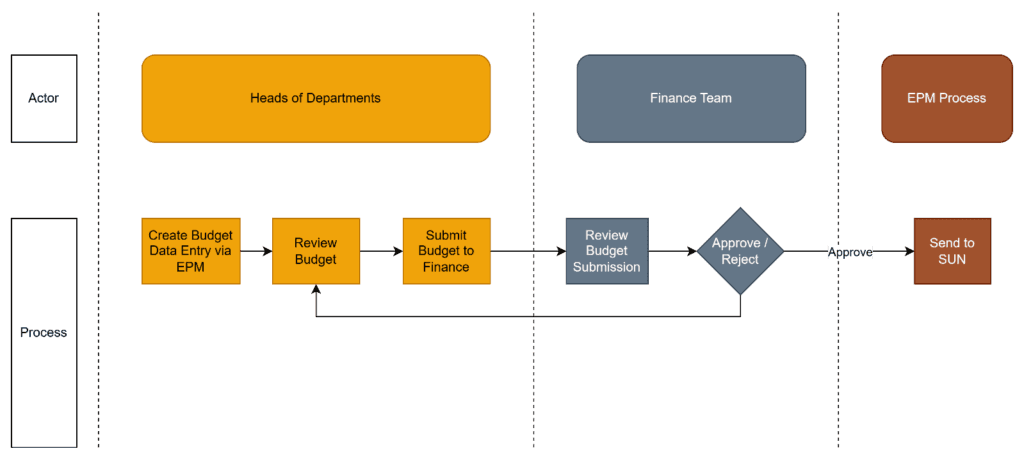
Businesses can grant any relevant heads of department access to Infor EPM to start “seeding” for budgeting and forecasting rather than having each function submit its own version of revenue and expenses for the next financial year based on past data, which might be inconsistent, incorrect, or not in the format finance prefers.
“Seeding” a new budget version with Infor EPM
Seeding is the process of pre-populating the budget model with a meaningful starting point before any human input is requested.
In a spreadsheet-based process, the equivalent would be copying last year’s actuals into a new template and distributing it to department heads. With Infor EPM, data automatically flows in as the platform connects to and pulls all details from its source systems.
Read more: What Is Rolling Forecasting? Benefits, Implementation Steps, and Best Practices
For organisations already using Infor SunSystems as their financial management system, the connection to EPM is managed through Infor OS and Infor ION. ION acts as the integration middleware between the two systems. Thus, when transactions are posted and periods are closed in SunSystems, the financial data is automatically available to EPM through the Infor Data Lake, without a manual export or CSV upload.
However, Infor EPM is not exclusive to SunSystems. The same integration can also be applied if organisations are running third-party ERP or financial management systems.
The data that flows through includes the chart of accounts structure, cost centre and analysis dimension hierarchies, and period actuals at the level of detail that EPM’s planning model is configured to receive. EPM maps this incoming data to its own model dimensions (business units, departments, cost categories, etc.) according to the configuration set during implementation.
Once the actuals load completes, each account in the budget model has a prior-year actual value against it. Finance can configure the seeding logic to apply a rule set at this point or to present the raw actuals as the starting point for department heads to review and adjust.
Department heads do not open a blank template. They open a pre-populated view of what their cost centre actually spent last year and are asked to adjust it. This changes the nature of the conversation from “what should I put in this cell?” to “do I agree with this starting point, and if not, why not?”
What finance teams control
Finance determines whether to seed from prior-year actuals, prior-year budget, a weighted average, or a combination before the budget cycle begins. Different cost categories can use different seeding rules, which are configured in EPM and applied automatically when the actuals load runs.
Things to note during data entry: Driver inputs
A driver is an operational or business metric that determines a financial output. For example:
- Occupancy rate is a driver of room revenue
- Headcount is a driver of payroll cost
- Production volume is a driver of raw material expense
- Energy consumption per unit is a driver of utility cost
In Infor EPM, driver inputs are the planning assumptions agreed upon by finance and operational teams that will flow through the entire model. These assumptions form the shared foundation for every department’s budget, ensuring that the occupancy rate the revenue manager is planning against is the same rate the finance team uses to model staffing ratios and distribution costs.
Infor EPM’s drivers can be configured and used in several ways:
- Revenue drivers: occupancy rate by period, average daily rate by segment, channel mix percentage, covers per service in F&B, ancillary revenue, etc.
- Cost drivers: payroll percentage uplift, cost inflation by category, utility cost per unit consumed
- Volume drivers: production units, student headcount, enrolled patient days, contracted service hours
- Currency drivers: exchange rates for multi-currency consolidation
Some drivers, particularly those owned by operational functions, e.g., the revenue manager’s ADR and occupancy projections, the HR team’s headcount assumptions, the procurement team’s supplier price expectations, etc., may be entered by those functions directly, with finance reviewing and approving before the model is seeded for departmental submission.
What finance teams control
The primary driver assumptions are owned by finance and set before the departmental submission stage opens. This ensures that department heads are working against a consistent set of planning parameters rather than each applying their own interpretation of, for example, next year’s cost inflation.
For a detailed treatment of how driver-based planning connects revenue and finance assumptions in hotel groups, check out the blog article below.
Read more: The Collaboration Gap in Hospitality: Why Revenue Managers and CFOs Rarely Budget From the Same Page
Departmental submissions, review, and iteration but without an email chain
It is not uncommon to see a file named Budget_v2_final_FINAL_20261103.xlsx. This naming convention works for a while, until someone edits the wrong version, until the file gets overwritten, or until finance needs to compare version 2 to version 4 and there is no systematic way to do it.
Version control is built into Infor EPM. The model always has one active version. Past versions are automatically labelled and timestamped, ready for recall or comparison at any time, preventing any accidental or intentional overwriting.
Moreover, by providing a centralised platform that everyone can use, Infor EPM addresses the endless spreadsheet-email chain problems. The audit trail in EPM does not live in an inbox. When finance wants to challenge a budget line, for example, why did Operations increase maintenance costs by 35 per cent?, they can raise a query directly against that cell, and managers can respond back, all within Infor EPM. The query is timestamped, attributed to the finance team member who raised it, and visible to the department head as a notification in the system.
When the budget is locked and audited twelve months later, the full conversation about that specific budget line is retrievable in a few clicks, not buried in an email thread from October that no one saved.
Locking the budget in Infor EPM and closing the loop with SunSystems
Once the approved version of the budget has been confirmed, finance “locks” it in EPM; i.e., the version is designated as the official baseline and thus cannot be edited, overwritten, or modified. It becomes the reference point against which actual performance is measured throughout the year.
Locking in Infor EPM is the beginning of the performance management cycle. From the moment the budget is locked, every period close in the financial management platform automatically triggers a comparison against the locked budget in Infor EPM.
So, how do actuals flow back in after the lock? Let’s use the same illustration of the Infor EPM-Infor SunSystems integration above to explain.
When a period is closed in SunSystems, the actuals for that period are pushed to EPM via the Infor Data Lake. They appear in the model against the locked budget without any manual intervention. This means that on the first working day after period close, finance can open EPM and see the current period’s actuals compared to consolidated budget across every account, every cost centre, and every business unit. No export, no manual reconciliation between the financial system and the planning model.
From locked budget to rolling forecast in Infor EPM
The locked annual budget is the starting point for the organisation’s rolling forecast process. Infor EPM allows finance to generate a new forecast version at any point in the year by taking the locked budget for future periods and updating assumptions based on current actuals and revised business expectations, without touching the locked budget baseline.
This separation between the locked budget and the live forecast is a meaningful structural feature. It means the organisation always has two distinct views: what was planned at the start of the year and the current best estimate of full-year outcomes. Managing these as two separate versions within the same model, rather than as a single document that gets updated over the year and loses its original form, is one of the operational advantages of EPM that is difficult to replicate in a spreadsheet environment.
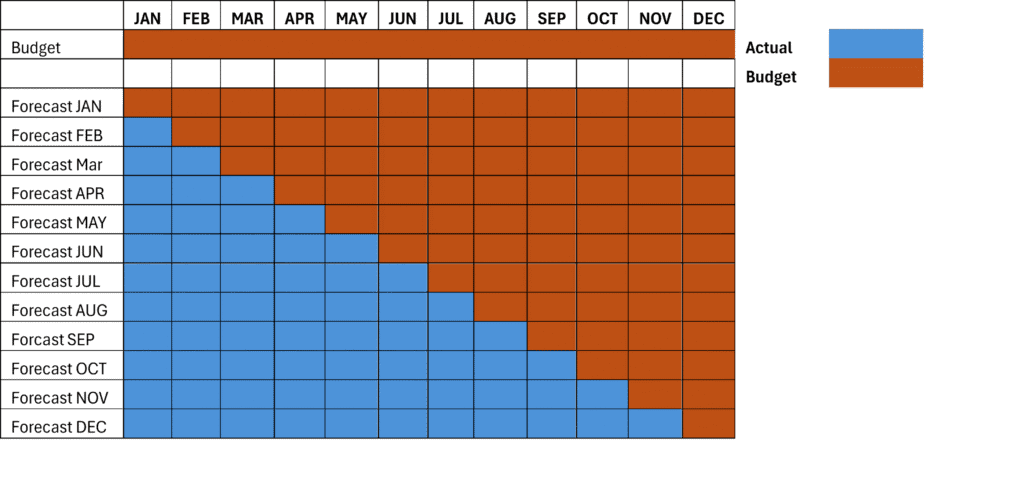
How Infor EPM incorporates actuals and budgets to make a forecast
The budget cycle in Infor EPM is not a brand new concept; the same flow exists in spreadsheet-based processes. You start with actuals, set assumptions, collect departmental inputs, review and iterate, and lock in a final version. What changes is the operational experience of each stage and the quality of what comes out at the end.
Together, they represent a qualitatively different experience of the budget cycle, one where the process itself requires less manual effort, and where the output is a plan that both finance and operational teams have contributed to, can interrogate, and are working to execute.
Work with TRG to implement Infor EPM and SunSystems
As an Infor Gold Channel Partner, TRG International has been helping over 1,000 hospitality businesses get value from Infor solutions since 1994.
Our hospitality solution suite, which includes SunSystems Cloud, EPM, Infor HMS, Infor OS, Infor Q&A, and more can be deployed individually to address a specific business need or integrated to form a comprehensive management platform. Implementation comes with user training and ongoing post-deployment support.
To see the EPM budget workflow in action, watch the on-demand webinar: From Manual to Agile Budgeting — or request a demo from the TRG team.