
Last updated: 27 August 2026 – Vui lòng nhấn vào đây để tham khảo bản thỏa thuận tiếng Việt
This Service Level Agreement (SLA) outlines the service level commitments provided by TRG International (TRG) Helpdesk as a First-Line Support provider for TRG-supported SaaS Application(s). As TRG relies on SaaS vendor(s) for second-line resolution, this SLA defines the scope and response expectations for TRG’s initial support activities.
This SLA does not replace or override the committed availability defined through the applicable SaaS Subscription Agreement and Order Form between Customer and other related SaaS vendor.
Definitions
- Application: Related TRG-supported software applications
- Business Hour/ Business Day: Monday to Friday, 08:00–17:00 (customer local time), excluding holidays observed by TRG.
- Customer: The organization or entity entitled to TRG’s Application managed services including first-line support.
- Escalation: The process of involving SaaS-related vendor’s second-line support or TRG’s Customer Support Manager when a case cannot be resolved by TRG first-line support due to scope limitations, software defects, or requires urgent business attention.
- First Response: The time from when an incident is sent or logged to designated support channels to when a Helpdesk agent first engages with the Customer.
- Incident: A single, reproducible issue, problem, or request logged through the TRG Helpdesk.
- Helpdesk: The central support team that receives, triages, and manages incidents reported by Customer through designated support channels.
- Workaround: A temporary solution that allows the Customer to continue operations until a permanent fix is available.
- 8×5: Covers the standard support plan during Business Hours as defined, which are 8 hours per day, 5 days per week
- 24×7: Covers the support plan for Critical incidents, which is available 24 hours a day, 7 days a week, including weekends and holidays
Support Channels
- Email: trghelp@trginternational.com
- Phone (VN): +84 28 73039993 – 8×5
- TRG Support Portal: http://support.trginternational.com – 24×7 online access
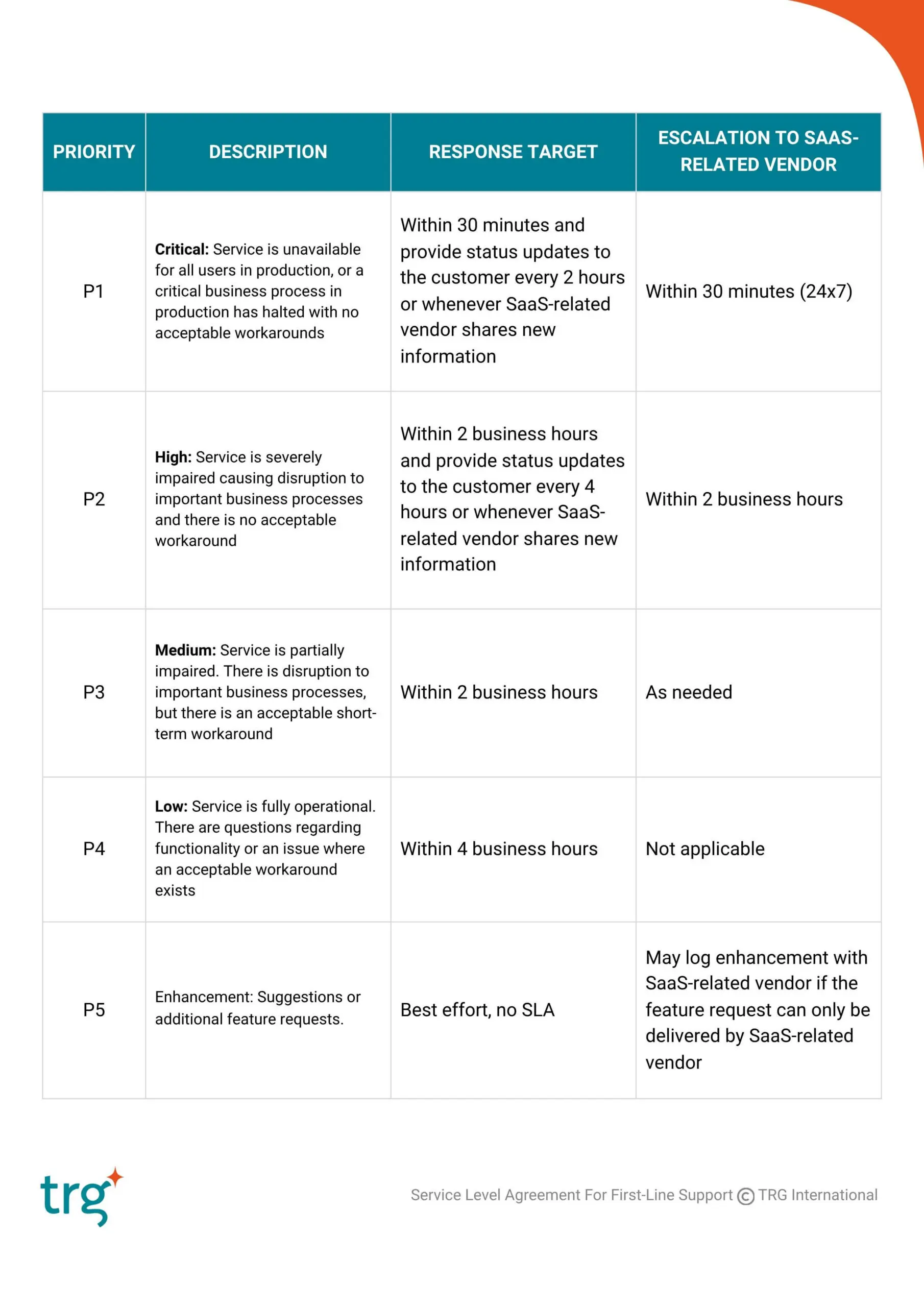
Incident Prioritisation & TRG Response Targets
TRG classifies incidents by severity and urgency to determine priority levels. Only Priority 1 and Priority 2 incidents are eligible for escalation to the SaaS-related vendor.
Scope of Support
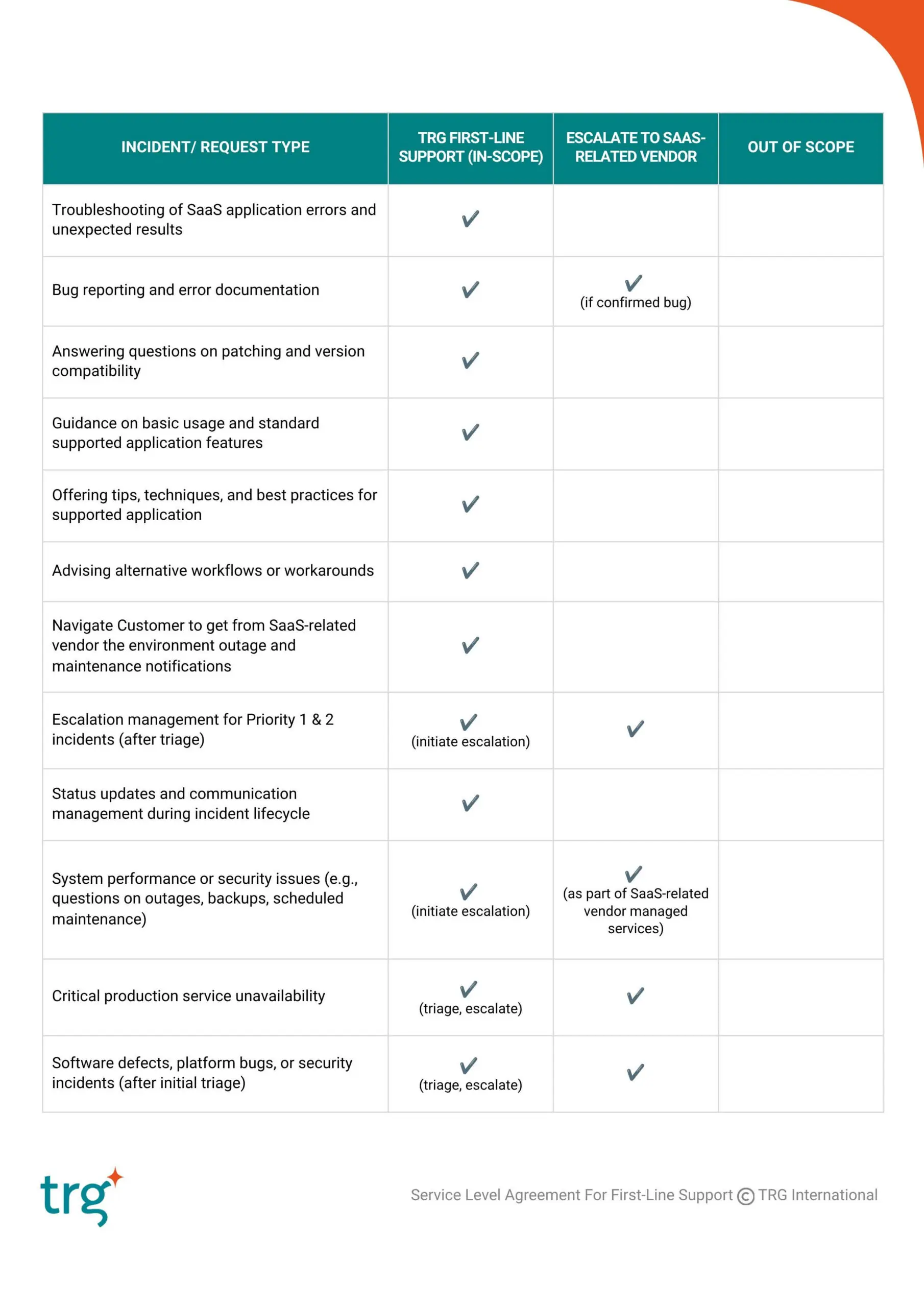
TRG, as a first-line support provider, on a basis of an 8×5 support plan, will:
- Receive, log, and triage all related software defect incidents reported by customers via the Support Channels established by TRG.
- Provide initial troubleshooting for issues with the TRG-supported applications.
- Offer guidance and advice on:
- Error messages, reproducible bugs, and unexpected application behavior within the SaaS environment.
- Basic usage, navigation, and supported application features.
- Patching and version compatibility questions, as relevant to SaaS (*)
- Assist in confirming the validity of the reported issues
- Advise on alternative workflows or workarounds to maintain business continuity until resolution.
- Communicate status and information updated by SaaS-related vendor for the customer’s reported issues when escalation is required
(*) Customer must follow SaaS-related vendor’s onboarding procedure with registration on its designated portal to ensure the prompt receipt of updates and notifications on SaaS outages, maintenance and patching information directly from such vendor.
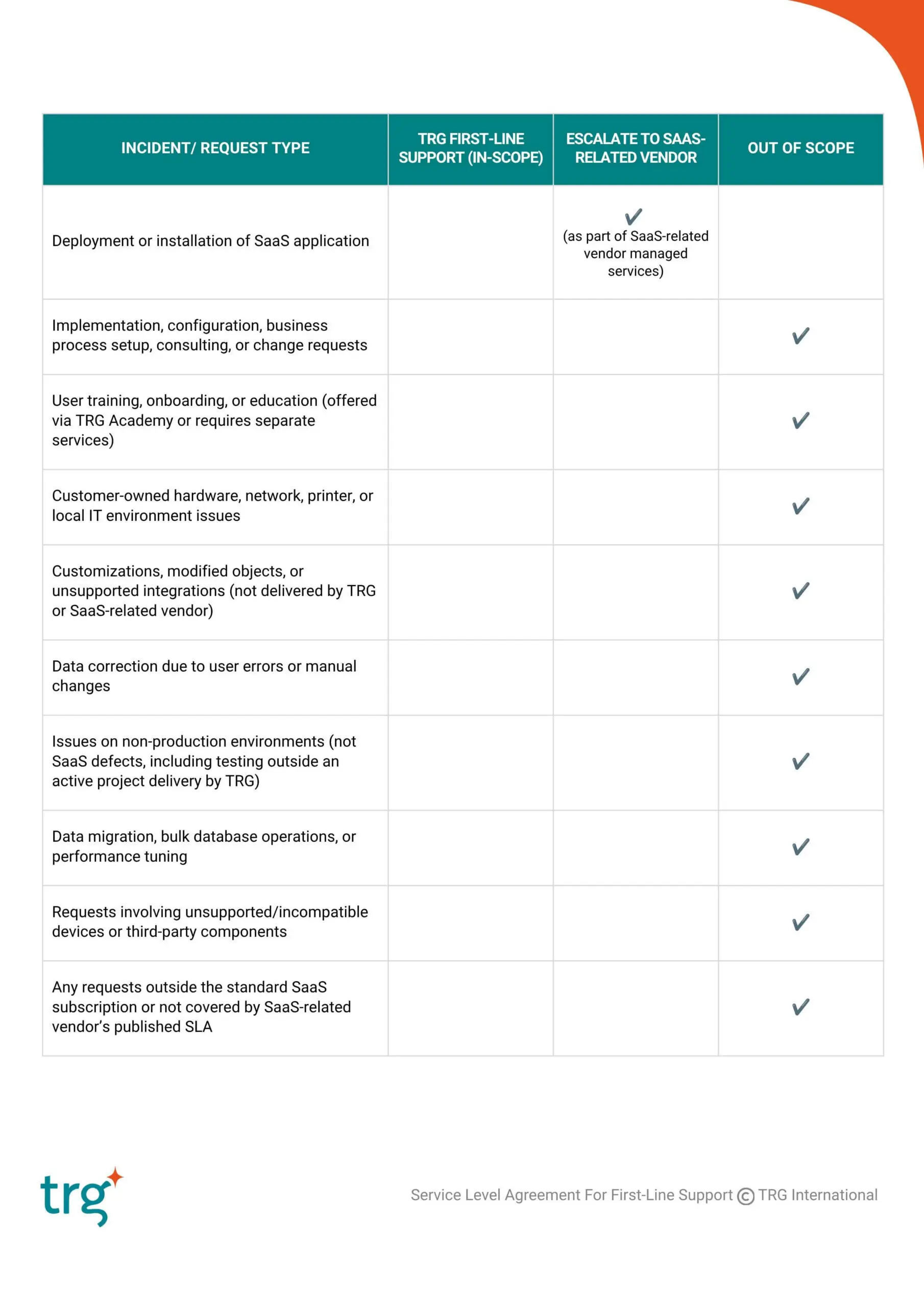
Summary Table
Escalation Procedure
For incidents classified as P1 or P2, or any case that requires SaaS-related vendor’s intervention (e.g., confirmed software bugs, infrastructure-related failures on SaaS vendor-hosted environments):
- Escalation to SaaS-related vendor will occur after TRG completes first-line triage and determines that second-line support is required
- TRG will submit the case in the SaaS-related vendor’s designated portal under the customer’s name
- TRG will track updates and relay communication between SaaS-related vendor and the customer
Escalation to TRG Customer Support Manager
If Customer believes a Support case requires a higher level of attention, Customer can self-escalate the case through the TRG Support Portal by updating the Priority. As part of this process, TRG asks that Customer accurately provide the escalation reason, business impact, number of people impacted, timelines, and other relevant details to help TRG properly determine the level of urgency required regarding the escalation as a note in the ticket.
If Customer would like a Support Manager to call, Customer can indicate that in the escalation request as well. Once escalated, the Support Manager and Support Analyst are notified of the escalation, so they can take appropriate action.
If Customer doesn’t have access to the TRG Support Portal, Customer can escalate by copying Customer Support Manager via email: duong.nguyen@trginternational.com
The use of escalations is reserved for issues that truly merit a higher degree of attention. It is not intended for issues that are effectively addressed with TRG standard operating procedures.
Review & Revisions
This SLA will be reviewed annually as part of TRG’s continuous service improvement process and may be updated to reflect service enhancements, operational best practices, or changes to applicable services and agreements. Any material changes will be communicated in writing to Customers.